October 22nd, 2026
{ Engineering }
Building Àríyá Before Friday: How Kotlin Multiplatform Helped Us Move Fast
Moronke Anifowose
At CXCon 2025, checking in an attendee wasn’t always as simple as finding a name and ticking a box.
Volunteers had to search through a long Excel sheet, sometimes typing an attendee’s full name into the Find field. And finding a match didn’t always mean finding the right person. Imagine searching for Anifowose Ayo and getting multiple results with the same name. You’d have to verify the attendee’s identity using their email address, locate the correct record, and then select the check-in option from a dropdown. All these extra steps added time, especially when people were queuing to get in.
We knew we needed a better way.
For CXCon26, we had more than 3,000 people registered. Of course, we didn’t expect everyone to show up, but we still needed to prepare for a crowd larger than we had anticipated. The challenge was that we had only a few days to get everything ready before Friday, the day of the event.
The team was already deep in an intense release cycle, so this wasn’t something we could spend weeks building in isolation. We needed a solution quickly, and it had to work on both Android and iOS.
We decided to build Àríyá, our own internal event management platform. For the mobile app, Kotlin Multiplatform (KMP) gave us a way to share much of the implementation across both platforms without building and maintaining two separate versions of the same core functionality.
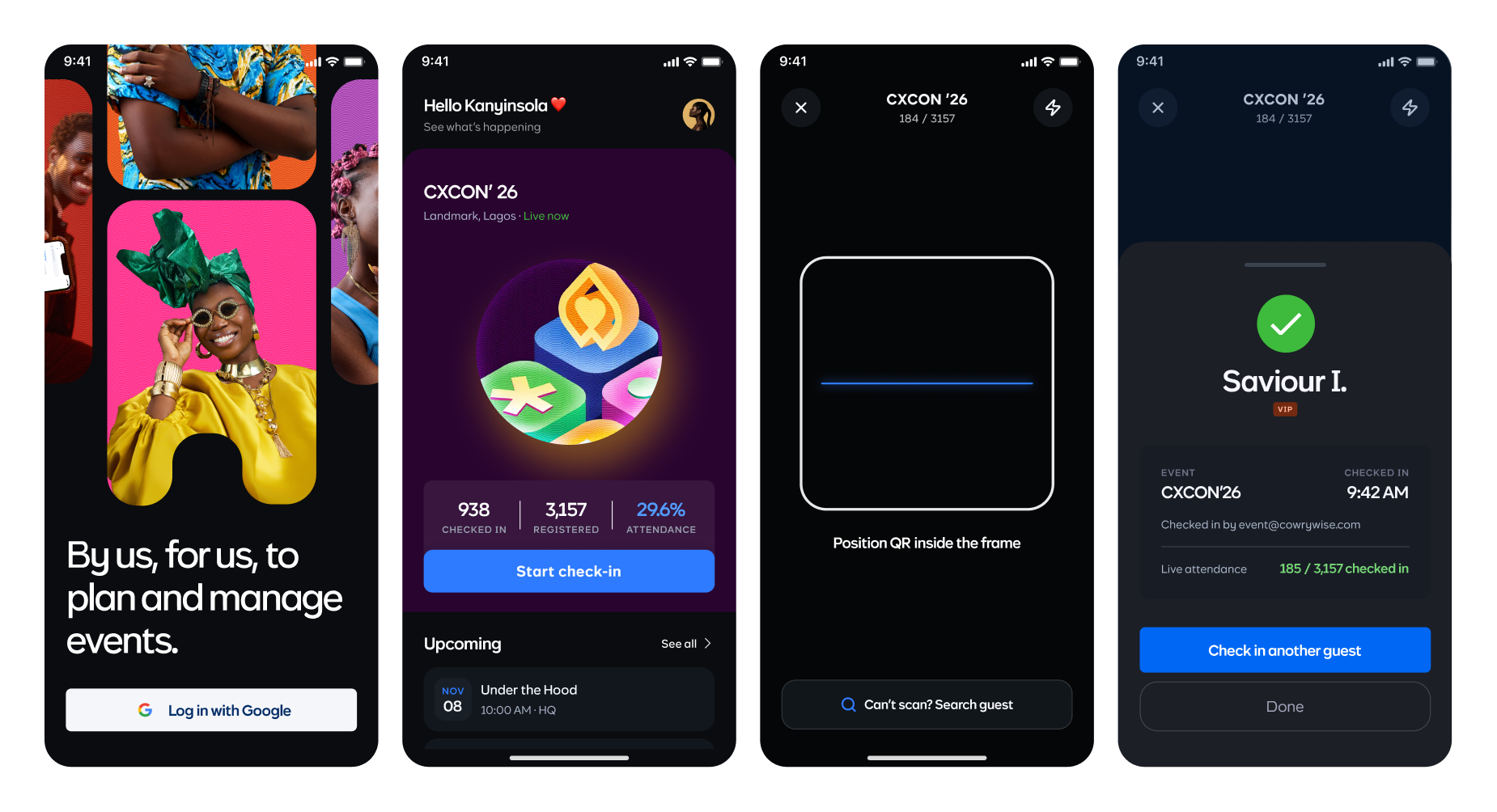
With Àríyá, attendees received personal tickets by email, and volunteers could scan the QR code on each ticket to check them in. The app returned the result, allowing volunteers to move straight to the next guest without searching through a spreadsheet or manually selecting a check-in option.
By the end of the day, over 900 guests had checked in. Our event statistics recorded an average of 18 seconds per check-in, with 687 guests checked in by noon. During the busy hour around 10 AM, 376 guests came through the process.
The significance of those 18 seconds isn’t just that scanning a QR code is quick. It’s that we removed the repeated searching, identity verification, and manual selection that made the old process slower.
Àríyá made check-in more direct. Instead of searching for the right attendee record first, volunteers could scan a ticket, identify the guest, and complete the check-in.
And faster check-ins were only part of the story. Àríyá also gave us real-time attendance figures and information about each attendee, helping us make decisions while the event was still happening.
Why Kotlin Multiplatform?
With a tight deadline and two platforms to support, we needed to be deliberate about how we built the mobile app.
I’ve worked with KMP on Cowrywise Kids, our native Android and iOS learning app for kids between 5-17, so I already had experience with the approach and an existing codebase to learn from. That experience gave me a starting point for making architectural decisions instead of figuring everything out from scratch.
For Àríyá, we used Kotlin Multiplatform with Compose Multiplatform to share much of the mobile implementation. Our shared Kotlin code handled data models, networking, repository logic, session handling, UI state, and much of the UI itself.
I used Ktor for networking, keeping the API communication within the shared implementation rather than maintaining separate networking logic for Android and iOS.
The idea was to share the parts of the application where the behaviour should be the same, while retaining native integrations where the platforms required them.
I kept the build structure deliberately small, with one shared mobile module and feature-level separation in packages. Authentication, events, check-in, attendee search, and statistics each had their own responsibilities without becoming separate Gradle modules that we’d have to wire together and maintain.
This was a conscious trade-off. I wanted clear boundaries in the code, but we also needed to avoid introducing unnecessary structural overhead for an MVP with a very short delivery window.
The shared module owned the event experience, while native integrations provided platform capabilities.
Google sign-in required an Android integration and an iOS bridge. The scanner’s state, QR filtering, and camera-permission flow lived in shared code using multiplatform libraries, while the camera itself ran through the relevant native platform capabilities.
The important boundary was between obtaining a Google identity or decoded QR value and deciding what Àríyá should do with it. Once those values entered the shared application flow, the rest of the experience could follow the same rules on both platforms.
That distinction matters. Sharing code doesn’t mean pretending Android and iOS are identical. It means identifying which behaviour genuinely belongs in shared code and keeping platform-specific responsibilities where they make sense.
For a project where volunteers could use either platform to check in the same attendee, having one implementation of the core rules reduced duplication and gave us one obvious place to make changes.
Building the check-in flow
Scanning a QR code looks straightforward. Making sure one scan produces the right outcome, even when callbacks arrive rapidly or the network is slow, takes more thought.
Camera callbacks can fire more than once for the same code. If every callback immediately triggered a request, one ticket could produce repeated submissions before the first response returned.
I handled the scanner as a small state machine:
Ready → Submitting → Result → Cooldown → Ready
When a scan is accepted, the app moves into a submitting state and hides the camera preview while the request is in flight. Repeated callbacks are ignored, the result remains visible long enough for the volunteer to read it, and a short cooldown prevents the next scan from immediately interfering with the current interaction.
This made the scanning experience more predictable. Volunteers didn’t need to understand what was happening behind the scenes. They just needed a clear result and an easy way to move to the next guest.
The backend remained the source of truth for attendance. It validated the event-specific QR token against the event and attendee records, determined whether the guest could be checked in, and recorded who performed the check-in and when. The app displayed the outcome: checked in, already checked in, or invalid QR.
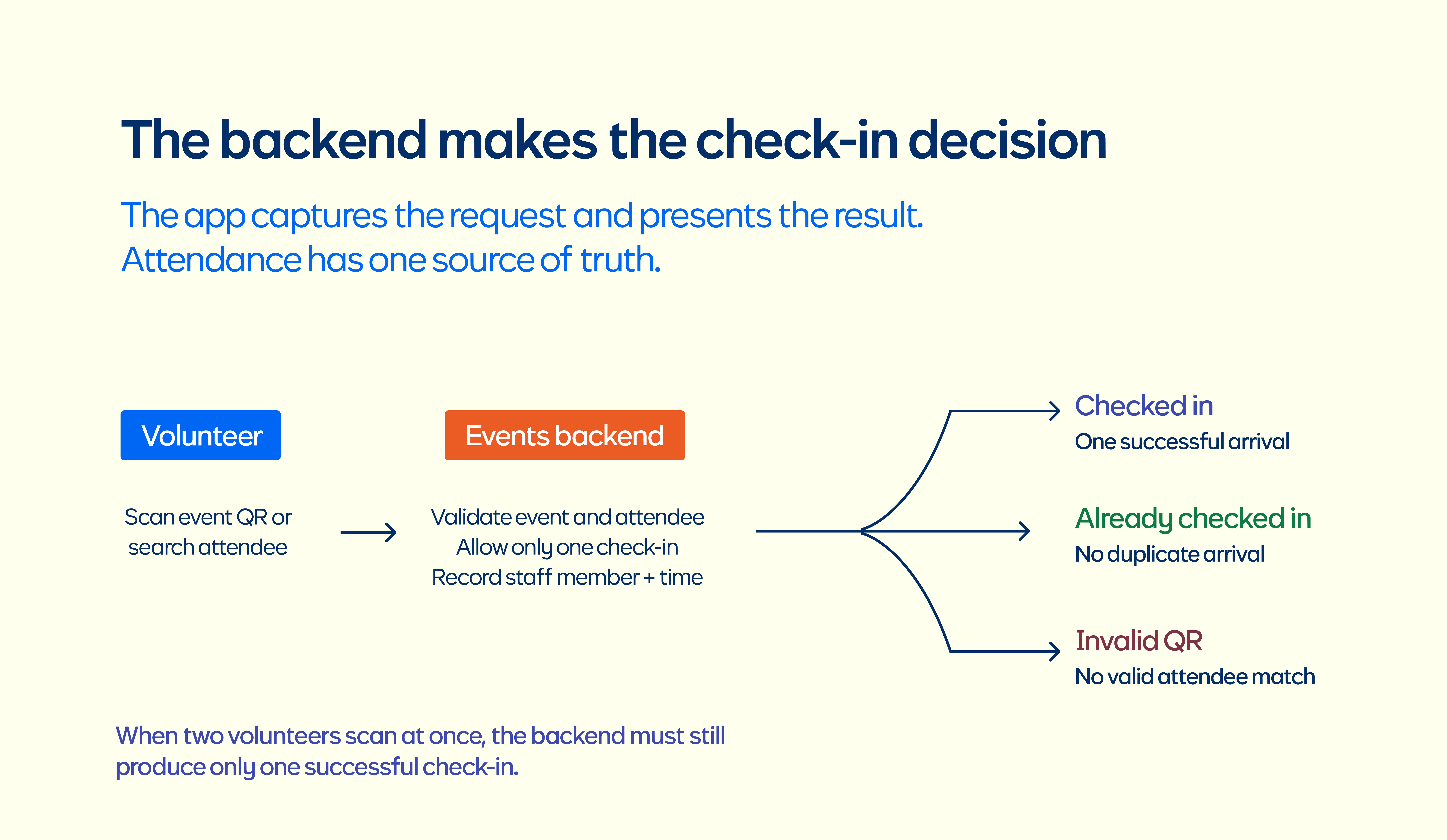
We also needed a way to handle attendees who couldn’t find their tickets. Volunteers could search by name, email, or phone number and use the same backend check-in flow.
The goal was to make the usual path as direct as possible without leaving volunteers stranded when something unexpected happened.
When a guest cannot find their ticket, manual search uses the same backend check-in path. Volunteers can search by name, email, or phone, then get the same result interface. We also made “Scan next guest” reuse the scanner already in the navigation stack. That sounds small until someone has checked in dozens of people and does not want to fight their way through duplicate screens.
The edge cases mattered as much as the happy path
Àríyá is an internal Cowrywise tool, so we integrated with our existing authentication service rather than introducing a separate sign-in system.
Staff sign in with their Cowrywise Google account, while backend permissions determine which events and features they can access.
This matters because not everyone needs the same level of access.One example shows why handling permissions properly matters.
A volunteer might have permission to check in attendees but not to view attendance statistics. If the statistics request is denied, the current event should still load and the volunteer should still be able to do their job.
We handled access to these features separately so that a restriction on one feature wouldn’t unnecessarily block the rest of the experience.
With the relevant application behaviour shared, we could keep the experience consistent across Android and iOS while respecting the permissions returned by the backend.
The broader lesson for me is that a cross-platform architecture needs to account for more than the happy path. Authentication, permissions, errors, and navigation all affect how the application behaves in practice. They need to be part of the design from the beginning, not details left until the end.
Engineering Experiences started at the door
The theme for CXCon26 was Engineering Experiences, and Àríyá became a practical example of what that meant to me.
An attendee’s experience starts before they enter the venue. Volunteers need tools that help them do their jobs without unnecessary friction. Organisers need to know what’s happening while the event is still going on, not hours after everyone has left.
At CXCon26, the attendance figures weren’t just useful for tracking how many people had arrived. They helped us plan for the people who were still coming.
As the numbers climbed, we could see that the available seating was no longer enough for the crowd we expected. Rather than waiting until the hall was packed and people were struggling to find seats, we could act on the figures and arrange additional seating.
The same applied to food and merch. We could see how many guests had checked in and use those figures to plan for the people still arriving. This helped us account for how much food and merch we needed, rather than relying on manual headcounts or waiting until supplies became a problem.
Àríyá also helped us identify guests through their tags immediately after scanning their QR codes. We could tell when someone was a VIP or a speaker without having to call another team member to verify their identity.
That meant less back-and-forth and a smoother experience for both volunteers and guests. Our event statistics showed that all 15 speakers checked in, and having their identities readily available helped us know who had arrived without relying on someone else to confirm it.
This visibility extended beyond registration. Volunteers handling food, seating, merchandise, and event announcements could access attendance figures and make decisions based on the same real-time information.
We didn’t have to depend on someone manually counting attendees, passing numbers around, or estimating how many people were already in the venue. The figures were available, and the teams responsible for different parts of the experience could plan accordingly.
One statistic stood out to me: one volunteer checked in 347 guests. Three volunteers collectively handled roughly three-quarters of all check-ins.
We weren’t just replacing Excel with an app. We were giving the entire team better information to work with, helping them identify guests, plan resources, and make more timely decisions.
Why build it ourselves?
There was a joke from the PM (Kanyinsola) during the launch about using Luma or Tix when there was “rice at home”. 😅
The joke landed because we had engineers, designers, and other teammates who could build something that fit our needs. But the decision wasn’t simply about building our own version of an existing tool.
Cowrywise runs different kinds of events, and we wanted a platform that fit our authentication, staff permissions, check-in workflow, and reporting needs. We also wanted to own the experience and improve it as those needs evolved.
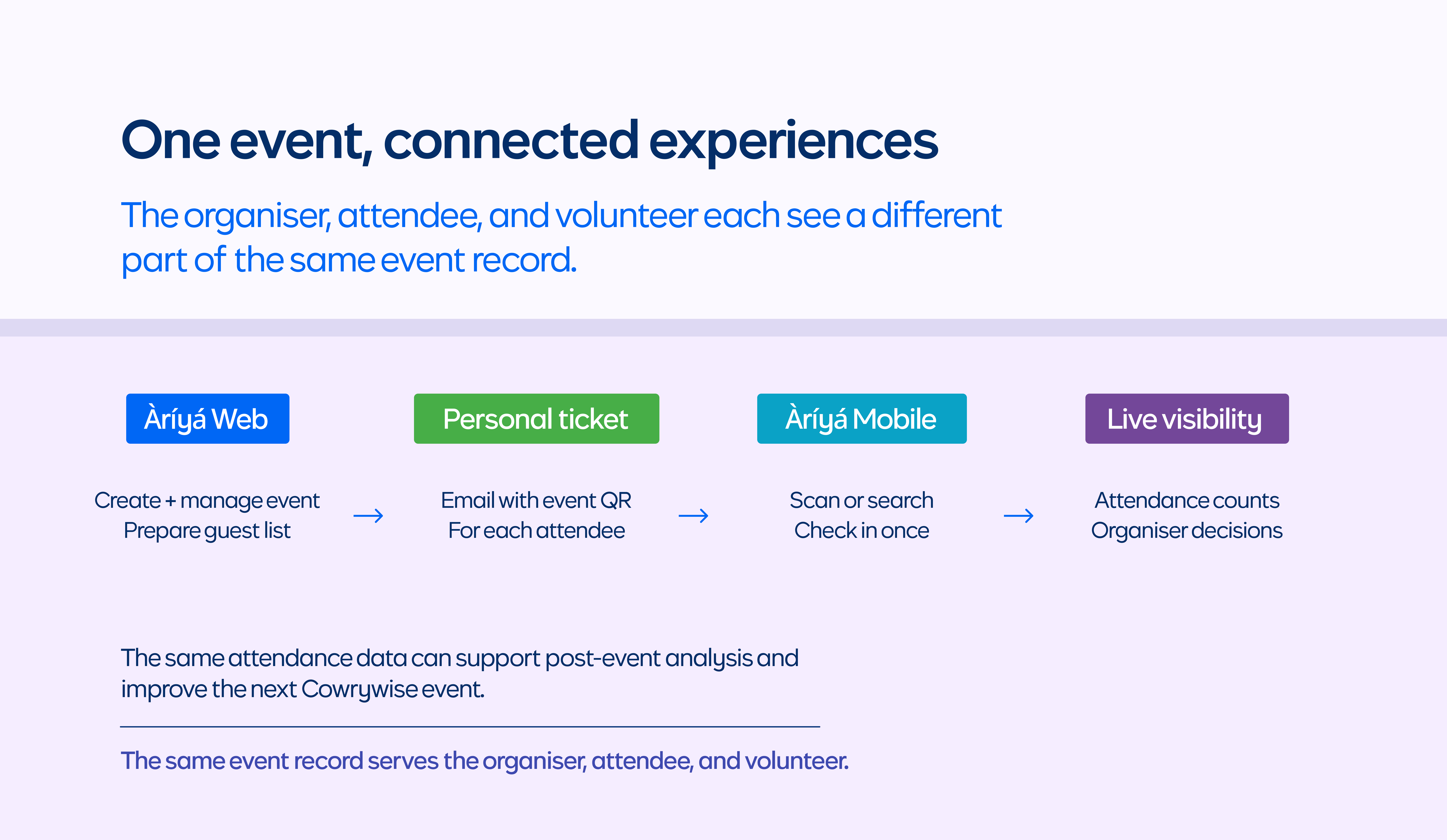
Àríyá brings together a web app for creating and managing events, personal tickets sent to attendees by email, a mobile app for volunteer check-in, and an attendance dashboard that gives organisers visibility into arrivals as they happen.
It gave us a foundation we could use beyond CXCon, across different Cowrywise events and communities.
We didn’t need to recreate every feature offered by established event management platforms before we could get value from it. We needed to solve the problem in front of us, deliver a better experience, and leave room to grow.
That is another lesson in simplicity: knowing what not to build can be just as important as knowing what to build, especially when the deadline is already fixed.
Testing and shipping before Friday
Building for two platforms under a tight deadline meant that getting the code to compile wasn’t enough. We needed confidence that the app would work when volunteers started using it at the event.
We combined automated tests with manual testing on Android and iOS. That gave us a way to verify application behaviour while also checking the complete experience on the actual platforms we needed to support.
For a check-in app, the full workflow matters. Authentication, scanning, backend responses, error states, and navigation all need to work together. A test that covers one piece of logic is useful, but it doesn’t replace checking how the pieces behave together in the app.
The deadline also meant making practical decisions about where shared code could save us time and where native integrations still needed attention. KMP reduced the amount of duplicated implementation we needed to maintain, but it didn’t eliminate platform-specific testing or the work required to get each app ready.
That is worth emphasising because cross-platform development isn’t a shortcut that makes the second platform free. It is an architectural choice that can reduce duplication and make shared behaviour easier to maintain, provided you draw the boundaries thoughtfully.
In our case, having prior KMP experience helped us get moving quickly. We could build on patterns I already knew while focusing on the requirements specific to Àríyá.
What I took away from building Àríyá
Building Àríyá reminded me that engineering isn’t measured by how complicated a solution looks. It is measured by the problem it solves and the experience it creates for the people using it.
From a technical perspective, the biggest takeaway was the value of sharing the right things. Kotlin Multiplatform and Compose Multiplatform allowed us to share much of the mobile implementation, while native integrations handled capabilities that needed to remain platform-specific.
That balance helped us build for Android and iOS without maintaining two separate implementations of the same core behaviour. My experience with CWKids gave me patterns to build on, and combining automated and manual testing helped us prepare the apps for the event.
The impact also extended beyond the mobile app. Faster check-ins, real-time attendance figures, and immediate identification of speakers and VIPs gave the wider team better information to work with throughout CXCon26.
None of this would have been possible without colleagues willing to make the pieces come together during a demanding release cycle. The work across mobile, web, backend, authentication, email tickets, and design turned a scanner into an event platform. Massive shoutout to Daniel, Favour, Saviour, Kanyinsola, Luke, Precious, Didi, and everyone else who contributed. And to the volunteers at the door: Àríyá only worked because you used it, for more than a thousand guests, one scan at a time.
We started with a problem we didn’t want to repeat. We ended up with a smoother check-in experience and an internal platform that helped the whole event team make better decisions in real time.
Sometimes, the engineering challenge isn’t building the most complex solution. It’s finding the right solution, making thoughtful trade-offs, and getting it into people’s hands when they need it.
Sometimes, that starts with replacing a spreadsheet with a QR scanner.
P.S. While you’re here, check out Cowrywise Kids. The Word of the Day helps kids learn a new finance word each day. The Dangote Refinery IPO is open at the time of writing; you can review the offer and apply in the Cowrywise app under NG Stocks.
Next article

Obi Uchenna David;
{ AVP Engineering } Cowrywise